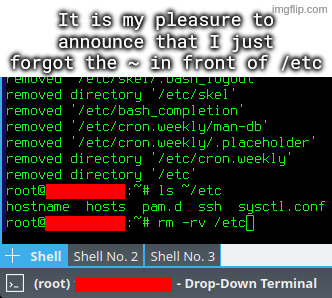
I accidentally untarred archive intended to be extracted in root directory, which among others included some files for /etc directory.
I went on to rm -rv ~/etc, but I quickly typed rm -rv /etc instead, and hit enter, while using a root account.
Reusing names of critical system directories in subdirectories in your home dir.

I agree with this take, don’t wanna blame the victim but there’s a lesson to be learned.
except if you read the accompanying text they already stated the issue by accidentally unpacking an archive to their user directory that was intended for the root directory. that’s how they got an etc dir in their user directory in the first place
Could make one archive intended to be unpacked from /etc/ and one archive that’s intended to be unpacked from /home/Alice/ , that way they wouldn’t need to be root for the user bit, and there would never be an etc directory to delete. And if they run tar test (t) and pwd first, they could check the intended actions were correct before running the full tar. Some tools can be dangerous, so the user should be aware, and have safety measures.
they acquired a tar package from somewhere else. the instructions said to extract it to the root directory (because of its file structure). they accidentally extracted it to their home dir
that is how this happened. not anything like what you were saying
I understand that they were intending to unpack from / and they unpacked from /home/ instead. I’m just arguing that the unpack was already a potentially dangerous action, especially if it had the potential to overwrite any system file on the drive. It’s in the category of “don’t run stuff unless you are certain of what it will do”. For this reason it would make sense to have some way of checking it was correct before running it. Any rms to clean up files will need similar steps before running as well. Yes this is slower, but would argue deleting /etc by mistake and fixing it is slower still.
I’m suggesting 3 things:
- Confirm the contents of the tar
- Confirm where you want to extract the contents
- Have backups in case this goes wrong somehow
Check the contents:
- use "tar t’’ to print the contents before extracting, this lists all the files in the tar without extracting the contents. Read the output and check you are happy with it
Confirm where:
- run pwd first, or specify “-C ‘/output-place/’” during extraction, to prevent output to the wrong folder
Have backups:
- Assume this potentially dangerous process of extracting to /etc (you know this because you checked) may break some critical files there, so make sure this directory is properly backed up first, and check these backups are current.
I’m not suggesting that everyone knows they should do this. But I’m saying that problems are only avoidable by being extra careful. And with experience people build a knowledge of what may be dangerous and how to prevent that danger. If pwd is /, be extra careful, typos here may have greater consequences. Always type the full path, always use tab completion and use “trash-cli” instead of rm would be ways to make rm safer.
If you’re going to be overwriting system files as root, or deleting files without checking, I would argue that’s where the error happened. If they want to do this casually without checking first, they have to accept it may cause problems or loss of data.
I dunno, ~/bin is a fairly common thing in my experience, not that it ends up containing many actual binaries. (The system started it, miss, honest. A quarter of the things in my system’s /bin are text based.)
~/etc is seriously weird though. Never seen that before. On Debians, most of the user copies of things in /etc usually end up under ~/.local/ or at ~/.filenamehere
I think the home directory version of etc is ~/.config as per xdg.
It should be ~/.local/bin
~/bin is the old-school location from before .local became a thing, and some of us have stuck to that ancient habit.
I use ~/config/* to put directories named the same as system ones. I got used to it in BeOS and brought it to LFS when I finally accepted BeOS wasn’t doing what I needed anymore, kept doing it ever since.
[OP] accidentally untarred archive intended to be extracted in root directory, which among others included some files for /etc directory.
Oh, my! Perfect use of that scene. I don’t always lol, when I say lol. But I lol’ed at this for real.
deleted by creator
So, you don’t do backups of /etc? Or parts of it?
I have those tars dir ssh, pam, and portage for Gentoo systems. Quickset way to set stuff up.
And before you start whining about ansible or puppet or what, I need those maybe 3-4 times a year to set up a temporary hardened system.
But may, just maybe, don’t assume everyone is a fucking moron or has no idea.
Edit Or just read what op did, I think that is pretty much the same
But may, just maybe, don’t assume everyone is a fucking moron or has no idea.
Well, OP didn’t say they used Arch, btw so it’s safe to assume.
(I hate that this needs a /s)
HAH rookie, I once forgot the . before the ./
o.7
Nvidia once did it in their install script
Oof. I always type the whole path just because I have made this mistake before.
That doesn’t protect you from typos.
rm -rv /home/schmuck /etc“Whoops, I accidentally added a space.”
I have three ways around this:
ls ~/etc… <press up arrow, replacelswithrm -rv>ls ~/etc…rm -rv !$- Add the commands to a simple script and use variables to remove the danger of a command line.
As a noob, those little wrappers are great.
Thankfully I don’t hit the space bar randomly (yet) but btrfs snapshotting has saved the day for other mishaps
I think the bigger point is that if you type the entire path, you are obviously typing more characters, which gives more opportunities for typos, whatever they may be.
It’s far safer to find ways to type less. Less typing, fewer typos. As long as you can do it safely.
I don’t think that applies when you intend to type something but accidental type enter after your first slash / :)
OOOOOOOOOOOF!!
One trick I use, because I’m SUPER paranoid about this, is to mv things I intend to delete to /tmp, or make /tmp/trash or something.
That way, I can move it back if I have a “WHAT HAVE I DONE!?” moment, or it just deletes itself upon reboot.
Just get a cli trash tool and alias it to rm. Arch wiki
That’s certainly something you can do! I would personally follow the recommendation against aliasing rm though, either just using the trash tool’s auto complete or a different alias altogether.
Reason being as someone mentioned below: You don’t want to give yourself a false sense of security or complacency with such a dangerous command, especially if you use multiple systems.
I liken it to someone starting to handle weapons more carelessly because the one they have at home is “never loaded.” Better safe than sorry.
Lol we should have “rules of rm safety”:
- Assume rm is always sudo unless proven otherwise.
- (EDIT)Finger should be off the Enter key until you are certain you are ready to delete.
- Never point rm at something you aren’t willing to permanently destroy.
- Always be aware of your target directory, and what is recursively behind it!
I think this is the best approach. I’ve created a short alias for my trash tool and also aliased
rmto do nothing except print a warning. This way you train yourself to avoid using it. And if I really need it for some reason I can just type\rm.If you want to train yourself even more effectively you can also alias
rmto runslinstead :)you can also alias
rmto runslinstead :)Choo-choo!!
Hehe I just thought of a hilariously nefarious prank: alias ls to sl. 😂
Yeah, there’s no need to alias it. Trash-cli comes with its own
trashcommand.
Hey that’s a pretty good idea. I’m stealing that.
After being bitten by rm a few times, the impulse rises to alias the rm command so that it does an
“rm -i”or, better yet, to replace the rm command with a program that moves the files to be deleted to a special hidden directory, such as~/.deleted. These tricks lull innocent users into a false sense of security.I’ve read this somewhere too! Where are you quoting it from if I may ask?
But yes I also agree 💯%. rm should always be treated with respect and care by default rather than “customizing the danger away.”
Quoting from Linux Hater’s Handbook, lovely read
EDIT: UNIX Haters, not Linux hater, my bad
… is it the “UNIX-Hater’s Handbook” from 1994 with a parody of “The Scream” on the cover?
Yup, that one. It’s also available here, sans cover - https://web.mit.edu/~simsong/www/ugh.pdf
LOL nice, I’ll have to check it out. :) Thanks!
i always do “read;rm ./file” which gives me a second to confirm and also makes it so i don’t accidentally execute it out of my bash history with control-r
Also stealing this. What an awesome tip
This need’s to be higher in the comments!
DId you try CRTL-Z?
instructions on clear, switched to vi mode in bash and cant exit
F
(That’s not going to help you, just paying my respects.)
I can’t type ctrl-z without reflexively typing bg after, so no joy there.
Let he who has not wrongly deleted system critical files in Linux cast the first stone.
Amateurs. You all did it accidentally. I deleted system critical files intentionally believing it was beneficial.
/dev is just all bloat with stupid recursive directories
A development directory? I don’t need that!
Also a lot of redundancy in there.
I can do one better. A similar ‘rm’ command but while a Windows disk was mounted read/write. So, 2 OSes damaged in one command.
nice!
rock = (rock_t) stones[0];LOL
Joke’s good enough it deserves a comment in addition to the upvote.
I appreciate the bytes and Δt spent
I am he. But I won’t
Great! Now you can enjoy that freshly assembled directory feeling, knowing that now you only have the configs in there that you need.
“Just a little off the top please”
This is why you should setup daily snapshots of your system volumes.
Btrfs and ZFS exist for a reason.
That or make your system immutable
That’s my current approach. Fedora Atomic, and let someone else break my OS instead of me.
You can still break your /etc folder. But many other folders are safe.
Personally I do both.
Use Nix. And keep your system config in git.
Wish ZFS didn’t constantly cause my proxmox to need to be forcefully restarted after the ZFS pool crashed randomly.
I get months of uptime on a ZFS NAS, though I’m not using Proxmox. I don’t think it’s the filesystem’s fault, you might have some hardware issue tbh. Do you have some logs?
I just reformatted back to ext after messing with it for about a month, been totally fine since.
I do also assume it was something screwy with how it was handling my consumer m2
I am running a zfs raidz1-0 pool on 3 consumer nvme in my workstation, doing crazy stuff on it.
Ran zfs under proxmox with enterprise nvme and had the same issue.
It is proxmox, not zfs
Is there any reason to use a root account? If you had used sudo for each privilege needing command in stead it would have stopped you.
Is there any reason to use a root account?
if you just borked your /etc and need to rebuild because you don’t have sudo anymore
I hand-edited sudoers.conf day one on the job without using visudo
So in one day, I learnd both how to move a volume from one AWS VM and that there’s no good reason not to use visudo.
Would it? I think it would have just let you do it.
I think they just mean you’d be prompted for a password, which should give you pause if you’re supposed to be deleting items in your home folder.
If you use sudo for each privileged command you wouldn’t typically use sudo to remove something in your home directory, so the command would fail. At which point you’d check why the command failed.
Whelp, time to restore the latest snapshot.
Things like these are right of passage on Linux :)
So good to see that, even in 2026, Unix Haters’ Handbook’s part on rm is still valid. See page 59 of the pdf
The biggest flaw with cars is when they crash. When I crash my car due to user error, because I made a small mistake, this proves that cars are dangerous. Some other vehicles like planes get around this by only allowing trusted users to do dangerous actions, why can’t cars be more like planes? /s
Always backup important data, always have the ability to restore your backups. If rm doesn’t get it, ransomware or a bad/old drive will.
A sysadmin deleting /bin is annoying, but it shouldn’t take them more than a few mins to get a fresh copy from a backup or a donor machine. Or to just be more careful instead.
Unix aficionados accept occasional file deletion as normal. For example, consider following excerpt from the comp.unix.questions FAQ:
6) How do I “undelete” a file?
Someday, you are going to accidentally type something like:
rm * .foo
and find you just deleted “*” instead of “*.foo”. Consider it a rite of passage.
Of course, any decent systems administrator should be doing regular backups. Check with your sysadmin to see if a recent backup copy of your file is available“A rite of passage”? In no other industry could a manufacturer take such a cavalier attitude toward a faulty product. “But your honor, the exploding gas tank was just a rite of passage.”
There’s a reason sane programs ask for confirmation for potentially dangerous commands
True, in this case trash-cli is the sane command though, it has a much different job than rm. One is remove forever no take backs, the other is more mark for deletion. It’s good to have both options imo. Theres a lot of low level interfaces that are dangerous, if they’re not the correct tool for the job then they don’t have to be used. Trying to make every low level tool safe for all users just leads to a lot of unintended consequences and inefficiencies. Kill or IP address del can be just as bad, but netplan try or similar also exist.
The handbook has numbered pages, so why use “page X of the pdf”? I don’t see the page count in my mobile browser - you made me do math.
(I think it’s page number 22 btw, for anyone else wondering)
I dont know if you use firefox on your phone, but i do, and i fucking hate it that i cant jump to a page or see the page number im on.
Mjpdf is decent, while still zen.
That is what I’m using. I don’t really read enough pdf:s to notice it normally, but I guess it’s another reason to get off my ass about switching browsers ¯\_(ツ)_/¯
The handbook has numbered pages, so why use “page X of the pdf”?
Because the book’s page 1 is the pdf’s page 41, everything before is numbered with roman numerals :)
I also wasn’t expecting anyone to try and read with a browser or reader that doesn’t show the current page number
deleted by creator
Edit: nevermind, wrong section.
Btw, what’s this about QWERTY to slow them down?
Far as i know, it’s to reduce finger travel?On mechanical typewriters the little arms that slap the steel letters onto the ink ribbon/paper could get physically jammed. QWERTY was designed to make it so that was less likely to happen by placing the keys in an order that discouraged it.
At least, that’s the way I learned it.
Source: trust me bro
Qwerty was developed so that typewriter hammers have a low chance of hitting each other and get stuck. It was never about finger travel or ergonomics.
PCs adapted the layout and unfortunately we stuck with it ever since. There are many better layouts, some more extreme in terms of difference to qwerty, some just fix the most blatant problems. Colemak and Dvorak for example.
Your first mistake was attempting to unarchive to / in the first place. Like WTF. Why would this EVER be a sane idea?
I don’t know if it should be a bad thing. Inside the tar archive the configs were already organized into their respective dirctories, this way with
--preserve-permissions --overwriteI could just quickly add the desired versions of configs.
Some examples of contents:-rw-r--r-- root/root 2201 2026-02-18 08:08 etc/pam.d/sshd -rw-r--r-- root/root 399 2026-02-17 23:22 etc/pam.d/sudo -rw-r--r-- root/root 2208 2026-02-18 09:13 etc/sysctl.conf drwx------ user/user 0 2026-02-17 23:28 home/user/.ssh/ -rw------- user/user 205 2026-02-17 23:29 home/user/.ssh/authorized_keys drwxrwxr-x user/user 0 2026-02-18 16:30 home/user/.vnc/ -rw-rw-r-- user/user 85 2026-02-18 15:32 home/user/.vnc/tigervnc.conf -rw-r--r-- root/root 3553 2026-02-18 08:04 etc/ssh/sshd_configKeeps permissions, keeps ownership, puts things where they belong (or copies from where they were), and you end up with a single file that can be stored on whatever filesystem.
I assumed something like this. That’s a perfectly valid usecase for a tar extracted to /.
But I love it how people always jump to the assumption that the one on the other end is the stupid one
that was my reaction when I saw a coworker put random files and directories into / of a server
I feel like some people don’t have a feeling about how a file system works
Its a pretty common Windows server practice to just throw random shit on the root directory of the server. I’m guilty of this at times when there isn’t a better option available to me, but I at least use a dedicated directory at the root for dumping random crap and organize the files within that directory (and delete unneeded files when done) so that it doesn’t create more work later.
I mean, there is a home directory for the root-user, that you could use for these things.
Root’s home directory only works if you’re sshing in as root (not a great practice, although its certainly not as bad as on Windows thanks to key auth. You can simply revoke the keys of the admin you just let go rather than resetting a bunch of passwords). The reason its common practice in Windows Server administration is a combination of common practices: having dedicated admin accounts in AD for each administrator, Windows lacking a decent directory for content shared between users, and of course the general laziness that Windows administration attracts and fosters.
Ahh, good old /opt/
Maybe they do and don’t fear the HFS? I mean do you use the HFS in a docker container?
What’s so bad about that? Except that is trigger me to not have it organized.
hard to properly set permissions and organize
That makes sense if there is more than one user for a server (i.e. work environment). I would not care if it was on my home lab server, except that the root folder is deleted and remade on each boot.
Be happy that you didn’t remeber the ~ and put a space between it and etc😃.